When looking at POAS vs ROAS in Google Ads, most accounts live on ROAS: if the platform says 3×, the account looks healthy—even when the P&L quietly says otherwise. Thin margins, mixed product economics, and incomplete tracking mean a “great” ROAS can hide campaigns that are actually losing money.
Profit on Ad Spend (POAS) is one way to shift Google from chasing raw revenue to chasing profit per conversion, so Smart Bidding stops scaling the wrong products. It’s useful, but narrower than most hype makes it sound, and it only works if your tracking and margin data are ready for it.
Table of Contents
Quick summary: what changes when you move from ROAS to POAS?
POAS doesn’t turn Google Ads into a full profit model. It does one specific thing very well: it changes the number the algorithm optimizes for.
- With ROAS, Google optimizes toward revenue per unit of ad spend. Every dollar of reported revenue looks equally good, regardless of margins.
- With POAS, you feed Google a conversion value that reflects profit instead of revenue (or at least margin‑adjusted value). Smart Bidding still works the same way, but the value signal it chases is now profit.
That means:
- High‑margin products and customer segments get more budget, even when their revenue looks smaller than low‑margin “bestsellers”.
- Campaigns that look fine on ROAS but lose money on the P&L become visible as “POAS < 1” and can be paused or rebuilt.
The rest of the system—attribution windows, click‑based logic, and the fact that Google doesn’t know your returns, shipping or LTV—stays the same. POAS is a better optimization target inside that reality, not a replacement for your spreadsheet or finance model.
What is POAS vs ROAS in Google Ads?
Most media buyers already know the ROAS formula:
- ROAS = Revenue ÷ Ad Spend
If a campaign spends 1,000 and reports 3,000 in revenue, ROAS is 3.0. On the Google Ads surface, that looks like a clear “scale” candidate.
POAS adds margin into the picture:
- Profit per conversion = Revenue × Margin − Ad Spend
- POAS = Profit ÷ Ad Spend
Consider two products with the same CPA:
- Product A: 100 price, 40% margin, 25 CPA → profit per sale = 15, POAS = 0.6.
- Product B: 250 price, 15% margin, 25 CPA → profit per sale = −10, POAS = −0.4.
On revenue, Google sees Product B as the clear winner—it generates more cash per click, so ROAS looks great. On profit, Product B is quietly losing money on every sale.
Feeding profit (or margin‑adjusted value) into Google Ads instead of revenue flips that decision: Smart Bidding will see Product B as a worse outcome than Product A and adjust bids and budgets accordingly.
Why a “great” ROAS can still lose money
ROAS only sees reported revenue and ad spend. It ignores most of the economics that decide whether a campaign is actually healthy.
Four things usually break the link between “nice ROAS” and real profit:
- Margin differences between products. If one SKU runs at 15% margin and another at 40%, a blended 3× ROAS can hide loss‑making “bestsellers” that the bidder loves because they convert.
- Fixed and variable costs the platform never sees. Shipping, payment fees, packaging, returns, and discounts live in your backend and spreadsheet, not in Google Ads. ROAS treats all revenue as equal, even if your finance team doesn’t.
- Returning vs new customers. Paying to reacquire loyal buyers at full discount will boost ROAS while adding little net new profit. Google doesn’t know that difference unless you explicitly feed it first‑party signals.
- Incomplete or noisy tracking. Browser‑only setups and black‑box apps under‑report conversions, mis‑report values, or double‑count events, which makes ROAS look better or worse than reality in unpredictable ways.
When you combine thin margins, missing costs, and messy tracking, it’s entirely possible to have campaigns sitting at 3× ROAS that are net‑negative once you line them up against the P&L.
What POAS actually changes (and what it doesn’t)
POAS doesn’t turn Google Ads into your full profit engine. It changes one critical input: the conversion value that Smart Bidding tries to maximize.
With POAS wired correctly:
- Each purchase event carries a value that reflects margin‑adjusted profit, looked up from your product catalog (Stape Store, Firestore or another database) at the server level.
- Smart Bidding treats that profit number exactly like it used to treat revenue. Campaigns, ad groups and products that generate more profit per unit of spend are pushed; those that generate less are throttled, even if their raw revenue looks larger.
What stays the same:
- Google still operates inside its usual attribution windows and click‑based logic; POAS doesn’t give it awareness of returns, multi‑order LTV, or six‑month cohort behaviour unless you build separate pipelines for those.
- You still need a separate profit model (spreadsheet, BI, finance) that includes all costs and long‑term value. POAS is a better optimization target inside your ad account, not a replacement for that model.
In other words, POAS is a tighter alignment between the bidding signal and your margins, not a magic switch that replaces proper pricing, retention or finance work.

When does POAS make sense, and who should avoid it?
POAS helps most when the account already looks good on ROAS but profit feels wrong, or when margins vary heavily across products or customer types.
POAS is a good fit when:
- You run e‑com or D2C campaigns with mixed margins: some SKUs or categories are thin, others are healthy, and ROAS currently treats them all the same.
- You’re a media buyer or performance team managing Smart Bidding (Target ROAS, PMax) and you’ve already discovered cases where branded search and returning customers inflate ROAS while new‑customer growth lags.
- You have clients spending enough (e.g., 5–50k+/month) that shifting budget from loss‑making SKUs to profitable ones meaningfully changes the P&L.
POAS is not the first move when:
- Tracking is still broken—GA4 vs backend doesn’t line up, or server‑side tracking isn’t in place—so conversion value is noisy to begin with.
- The store has hundreds or thousands of SKUs and no reliable cost/margin data per product, and nobody on the client side owns that data. In that case, POAS becomes a maintenance nightmare.
- The main issue is obvious (e.g., creative, landing pages, or basic account structure); tightening the value signal won’t fix those fundamentals.
A practical way to start is to use POAS on top categories or a subset of SKUs where margins and volume matter most, rather than trying to convert the entire catalog on day one.
What you need in place before POAS
POAS depends on two foundations: clean tracking and a living profit/margin database. If either is missing, changing conversion value will just move noise around.
First, tracking:
- Browser + server‑side purchase events must be clean and deduped. GA4 revenue should sit close to backend revenue (usually within ~10%), otherwise the base signals are wrong.
- Google Ads needs reliable purchase events and enhanced conversions so Smart Bidding sees enough real conversions to optimize; otherwise POAS will struggle simply because the algorithm is starved.
Second, margin/profit data:
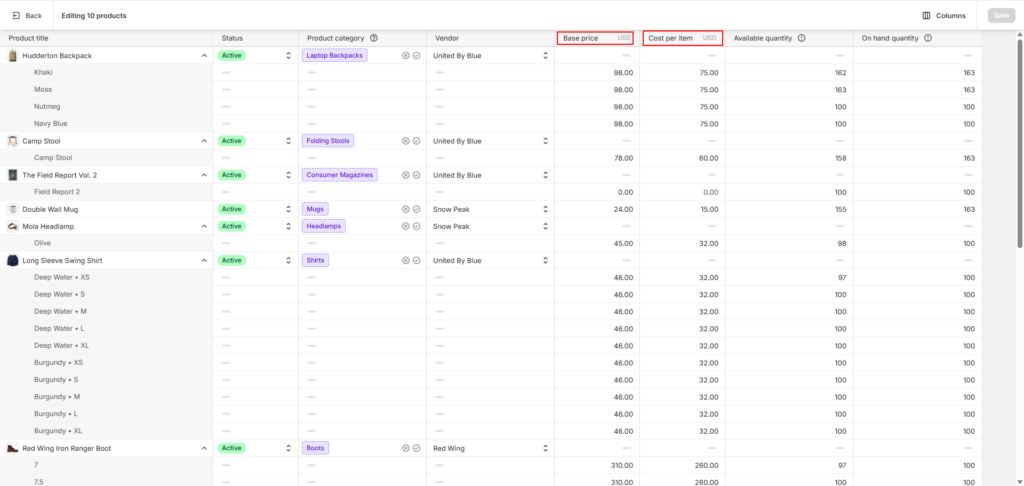
- Each product needs at least a cost or margin value stored somewhere stable in the stack—Shopify’s “Cost per item”, WooCommerce attributes, or a custom field in the CMS.
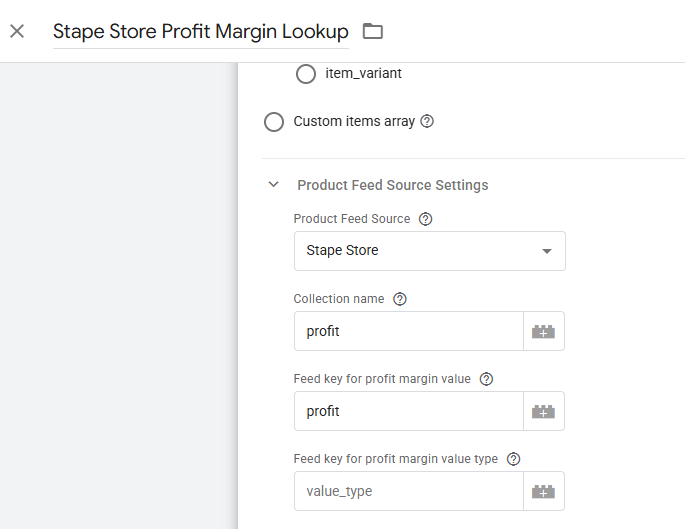
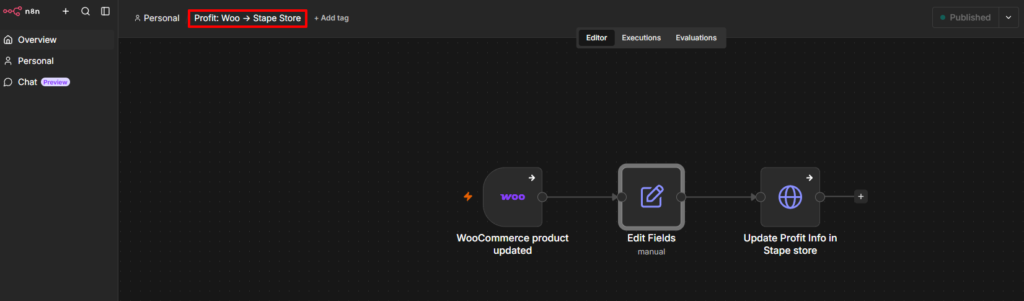
- Those values need to flow into an external store (Stape Store, Firestore, or another database) that the server can query on each conversion. This is where your workflow (Woo product updated → update profit in Stape Store) comes in.
Only when both layers are ready does it make sense to change what you send to Google Ads—otherwise POAS will sit on top of incomplete data and unreliable margins.
How POAS setups work under the hood
At a high level, a POAS setup does three things: stores margins outside the ad platform, looks them up server‑side on each purchase, and feeds profit instead of revenue to Google Ads. The details are technical, but the idea is simple.
1. Margin lives in the backend, hidden from customers
Every product needs a cost or margin value in the ecommerce backend. That value never appears on the product page; it lives in the admin.
- In Shopify, this is usually the “Cost per item” field on each product.
- In WooCommerce, it can be a custom attribute like profit_margin that’s assigned per product.
Those fields are where your finance or ops team expresses “how much we actually make per sale” in a way the tracking system can read later.
2. Margins sync into a server‑side data store
The backend fields alone aren’t enough. For POAS, the server that handles tracking needs its own memory of margins. That’s why most setups sync product data into an external store like Stape Store or Firestore.
The result is a fast, server‑side database keyed by product ID. When the tracking server sees a purchase, it doesn’t ask the ecommerce backend directly; it asks this dedicated store.
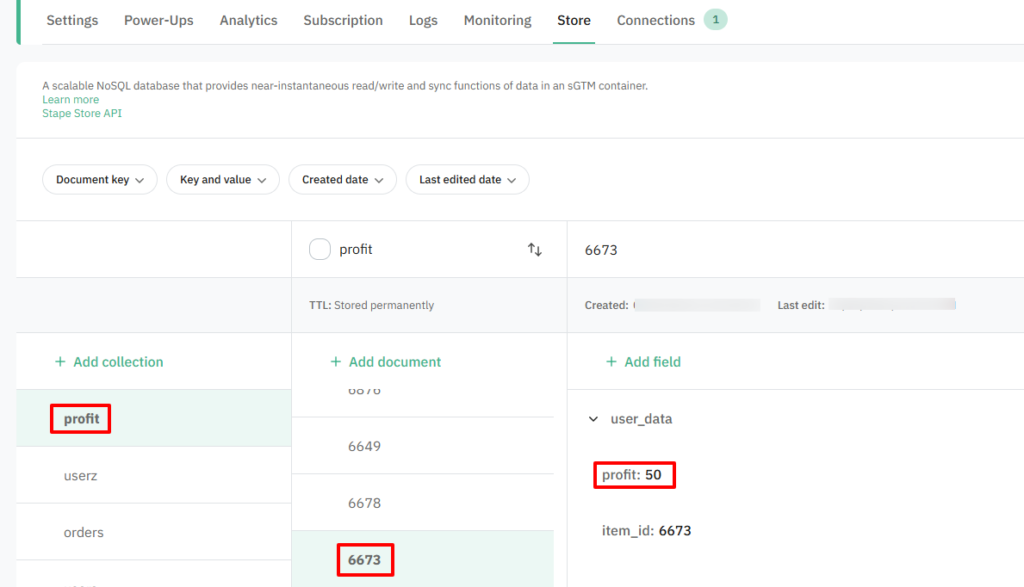
You can implement the same pattern with Firestore or any other database that your server‑side GTM can query. Stape Store is just a practical example for this article.
3. The server container looks up margin and calculates profit
When a purchase event fires, the server‑side GTM container receives order data: product IDs, quantities, prices, user identifiers, and so on.
Inside that server container:
- Variables read product IDs from the incoming event.
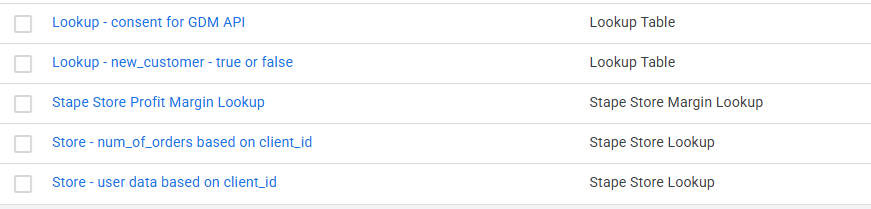
- Lookup variables call Stape Store (or your database) to fetch the margin or profit value for each product.
- A calculation combines revenue and margin to produce a single profit number for that conversion.
From a non‑technical perspective, you can think of it as:
“Every time an order closes, the server quietly checks ‘what did we actually earn on this?’ before telling Google.”
From a technical perspective, the container has:
- A margin lookup variable for products.
- Optional lookup variables for things like num_of_orders or new_customer if you want to adjust bidding differently for first‑time buyers.
4. Google Ads receives profit as conversion value
Once the server has a profit number, it sends a conversion to Google Ads with that profit as the value, along with the usual identifiers (GCLID, timestamps, user hashes).
On the Google side:
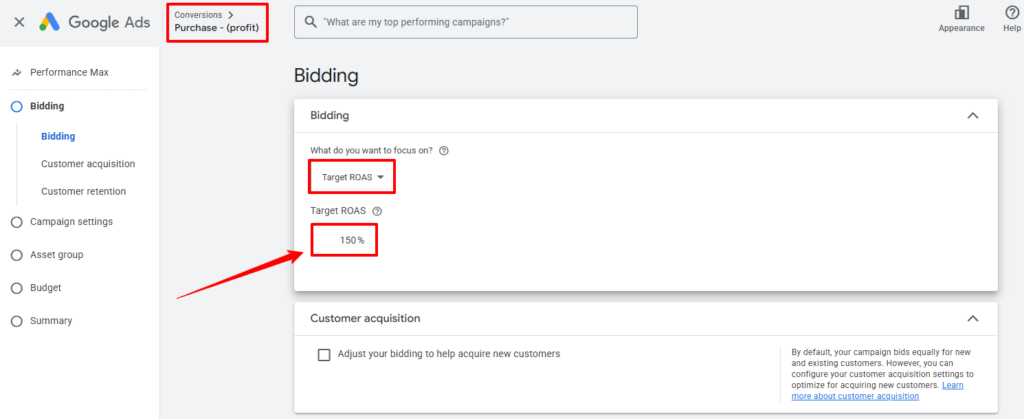
- Conversion actions are configured to use this profit value instead of raw revenue.
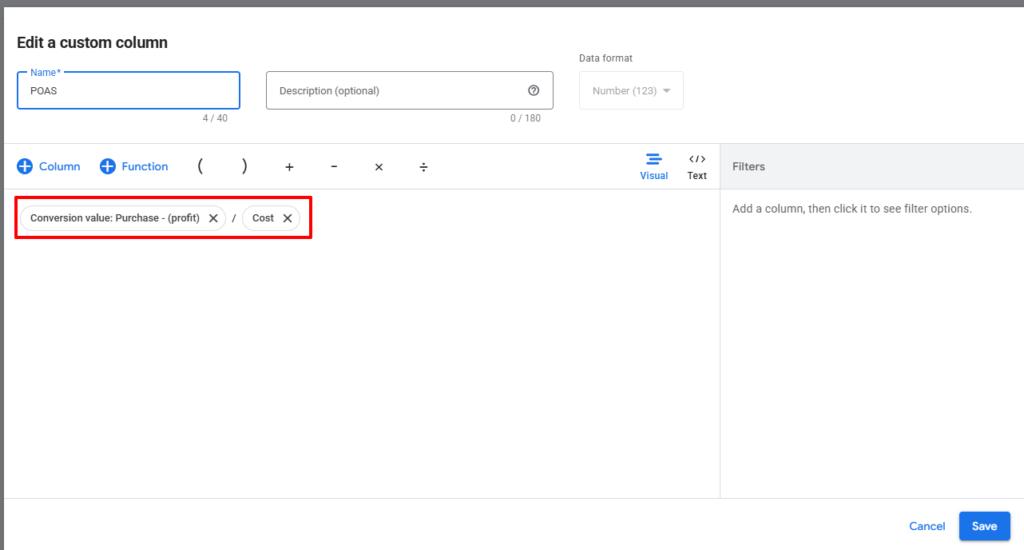
- Optional conversion value rules or custom columns let you compare revenue vs profit vs POAS inside the UI.
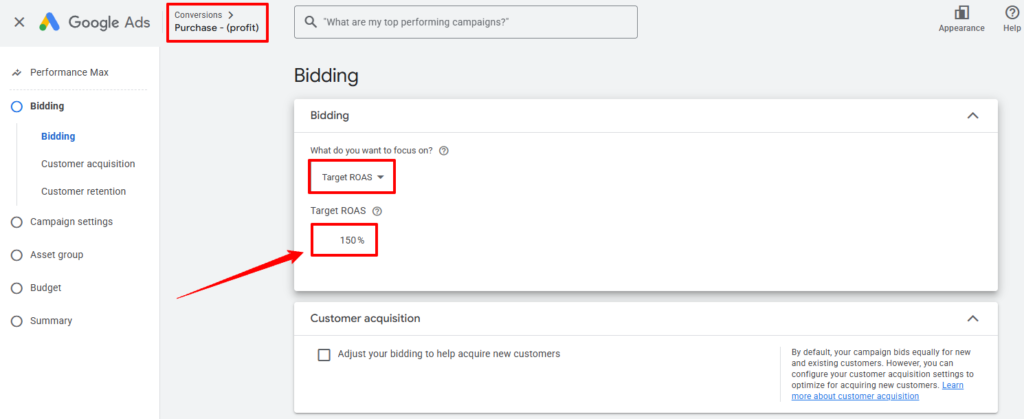
- Smart Bidding (Target ROAS, PMax) now optimizes toward “value” that actually reflects margin, while the mechanics of bidding remain the same.
For budgets in the 5–50k+/month range, this change in value signal is where POAS starts to matter. Small shifts in which SKUs and audiences get budget can add up to meaningful profit changes without touching creative.
The hardest part: keeping margin data fresh
In most POAS projects, the tech is solvable. The hard part is keeping margin data accurate for every product you want to include.
For small catalogs:
- You might have 20–50 SKUs where finance already maintains costs.
- Syncing those margins into Stape Store or Firestore and revisiting them monthly is manageable.
For large catalogs:
- Hundreds or thousands of SKUs, each with changing supplier costs, discounts and bundles.
- If nobody owns margin data, the numbers in the profit store drift out of date and POAS starts optimizing to yesterday’s economics.
That’s the major drawback:
“If margin data isn’t kept fresh, POAS becomes an illusion. You’re feeding Google very precise numbers that no longer match reality.”
Practical ways to handle it:
- Start with key categories or top 50–100 SKUs where most spend and profit live, instead of the entire catalog.
- Make margin maintenance part of someone’s job (ops/finance) and connect their workflow to your automation, so updates in Shopify or Woo automatically flow through to Stape Store or Firestore.
- Build visibility: simple internal reports that highlight products where cost fields are missing or haven’t changed in a long time.
Example: When ROAS says “scale” but POAS says “stop”
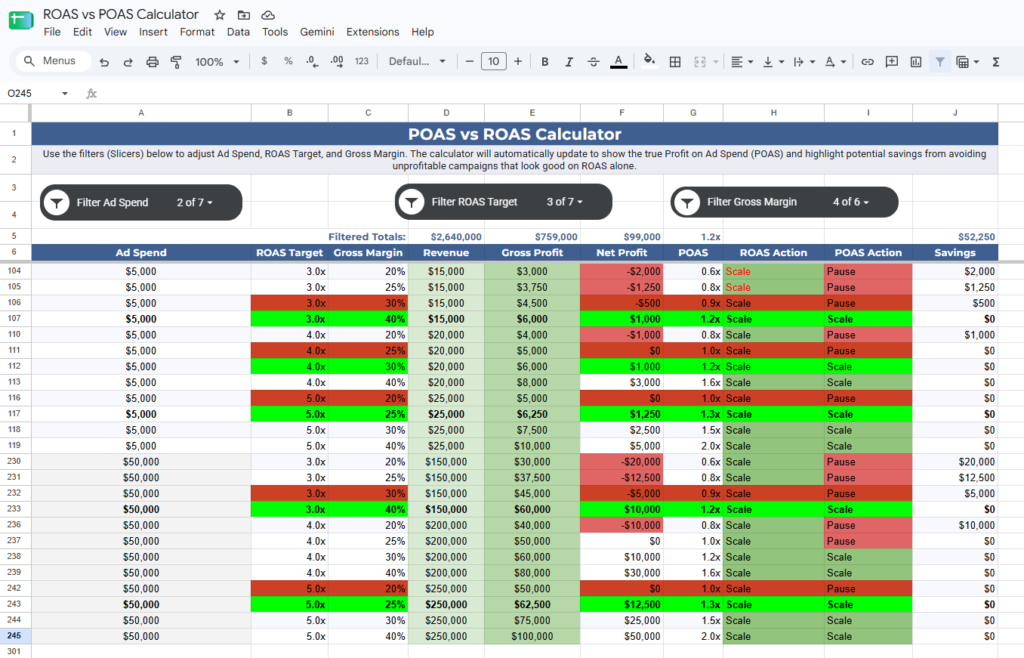
To see how POAS changes decisions, it helps to look at actual numbers side by side. Your calculator already does this by combining Ad Spend, ROAS, margin, profit, POAS, and “Scale/Pause” actions.
Take a simple case:
- Ad Spend: 1,000
- Reported ROAS: 3.0
- Margin: 20%
On revenue alone:
- Revenue = 3,000
- Gross profit = 600
- Net profit after ad spend = −400
- ROAS = 3.0
The dashboard says “3× ROAS” and looks healthy. But once you include margin and costs, the campaign is losing 400 per 1,000 spent, and POAS comes out at 0.6. In your calculator, that row clearly shows ROAS Action: Scale, POAS Action: Pause.
Real‑world POAS case studies show the same pattern at scale: accounts that looked like 3.2× ROAS winners turned out to be losing money on their bestsellers once margins were applied, and shifting bids toward profitable SKUs lifted gross profit by more than 30% at flat spend.
How to transition from ROAS to POAS without blowing up your account
Switching straight from revenue to profit as the conversion value can shock an account if you do it overnight. The goal is to test POAS safely while keeping the account stable.
A practical path:
- Start with diagnostics, not changes.
- Use your calculator and backend data to see which campaigns or products are profitable and which are not at current ROAS levels.
- Add custom columns in Google Ads (Revenue, Profit, POAS) if possible, so you can compare inside the UI before changing anything.
- Run POAS as a secondary view first.
- Keep revenue as the primary conversion value while you start sending profit as an additional metric or in a test conversion.
- Watch how POAS behaves over a few weeks—does it confirm what you see in the P&L, or reveal surprises?
- Adjust targets based on real margins, not guesswork.
- Many accounts set Target ROAS based on “safe” numbers rather than actual margins. Before you switch to profit, use backend data to define realistic targets (e.g., the minimum POAS or margin level that keeps the business healthy).
- Move one campaign or category at a time.
- Don’t flip the whole account in one go. Start with a single campaign or product set where margins are clear and volume is meaningful.
- Change that campaign’s conversion value to profit, monitor performance, and only then roll the pattern out to more areas.
- Keep a clear rollback path.
- Document the exact changes you make (conversion settings, value rules, bidding strategies).
- If POAS behaves unexpectedly, you can revert to revenue‑based values while you troubleshoot tracking or margin data.
As a rule of thumb, don’t switch a campaign to profit‑based Target ROAS until it’s already delivering around 50+ conversions per month with clean value tracking. Below that, the algorithm is mostly guessing.
FAQ
1. Is POAS always better than ROAS?
No. POAS is better only when margins vary and tracking is already clean.
If your products have similar margins and your main issues are creative, landing pages or basic account structure, ROAS is usually enough. POAS shines when you’re trying to stop scaling low‑margin SKUs that look great in Google but hurt the P&L.
2. How much ad spend do I need for POAS to be worth it?
POAS starts to matter when shifting budget between SKUs or audiences moves real money. In practice, that’s usually around 5–50k+/month in Google Ads spend.
Below that, it’s still useful to know which products are profitable, but the payoff from wiring full POAS into Smart Bidding is smaller than simply fixing tracking, creative and basic bidding hygiene.
3. How many conversions do I need before using POAS with Smart Bidding?
Smart Bidding needs data. Guides and Google’s own documentation suggest aiming for roughly 30–50+ conversions per month per campaign before you trust Target ROAS or other value‑based strategies.
If a campaign is getting fewer than that, it’s usually better to use POAS as a reporting layer first (columns, calculator, backend analysis) rather than switching the bidding to profit immediately.
4. Do I need perfect margin data for every product?
No. You need good enough data for the products that matter.
A practical approach:
a. Make sure cost/margin fields are accurate for your top categories or top 50–100 SKUs where most spend and profit live.
b. Keep those margins in sync with a server‑side store (Stape Store, Firestore, your own DB).
Trying to maintain perfect margin data for thousands of low‑volume SKUs can cost more than it returns. Start where POAS actually affects the P&L.
5. Does POAS replace my P&L or finance model?
No. POAS doesn’t see returns, refunds, payment fees, customer lifetime value or cohort behaviour unless you build separate data pipelines for those.
POAS is a way to align Google’s optimization target with margin, so you stop scaling loss‑making conversions. Your P&L and finance model still live outside the ad account and remain the place where you decide pricing, discount strategy, and whether the business is healthy overall.
6. Can I use POAS with Performance Max and value rules?
Yes, in principle. Performance Max and Target ROAS already support custom conversion values and conversion value rules, which let you adjust values based on audience, device or location.
If your tracking sends profit instead of revenue and value rules reflect real business priorities, Smart Bidding will optimize toward those profit‑based values. The key is to keep the underlying data clean and to test changes on one campaign or asset group at a time.
7. Do I have to use Stape to implement POAS?
No. Stape Store and POAS Data Feed are one convenient way to store margins and calculate profit server‑side.
You can build the same pattern with Firestore, BigQuery or a custom database as long as:
a. Product margins live in the backend.
b. Your server‑side GTM container can look them up quickly.
c. The profit value is sent to Google Ads reliably with each conversion.
In this article, Stape is the example because it’s widely used for server‑side tagging and POAS, but the core idea is stack‑agnostic.
8. What if my ROAS is already high—should I still care about POAS?
If your ROAS is high and profit and new‑customer growth are healthy, you’re in good shape.
But many accounts with 3×–5× ROAS turn out to be:
a. Over‑indexed on branded search and returning customers.
b. Over‑spending on low‑margin SKUs that look great in Google but weak on the backend.
POAS and related metrics (new vs returning, contribution margin) help you check whether “high ROAS” is actually aligned with business goals, not just the platform’s goal.
How I can help implement this
If you’ve read this far, you probably care about more than just making the ROAS number look good—you care about whether Google Ads is actually growing profit and new customers.
My work sits exactly at that intersection:
- I fix tracking and attribution first (browser + server‑side, GA4 vs backend, consent, deduplication), so the numbers in Google Ads and GA4 match your store and CRM.
- Then, where it makes sense, I help teams move from revenue‑based to profit‑aware optimization—feeding margin or profit into Google Ads, wiring POAS‑style setups via server‑side GTM and Stape Store/Firestore, and documenting everything so you stay in control.
If you want to explore this without a heavy pitch:
- You can DM me “POAS check” with your rough monthly spend, average ROAS, and margin range. I’ll run your numbers through the calculator and send back a short loom showing where POAS helps, where it doesn’t, and what would need to change in your tracking and margin data before you try it.
- If you already know you want someone to build the full system, I work white‑label with agencies and media buyers, and directly with D2C brands, to design and implement these setups end‑to‑end—tracking, margin store, server container, and Google Ads configuration.
No templates, no plugins as black boxes—just a documented, first‑party data pipeline that lets you see, and then control, how profit actually flows through your ad account.
“This follows the ‘Retrieve–Store–Sync’ first‑party data pattern popularized by Julius Fedorovicius’ First‑Party Data Masterclass—using a server‑side data store as the memory for margins and customer history.”