How I Set Up GA4 Server-Side Tracking + Google Ads Enhanced Conversions for an Ecommerce Store (Full Case Study)
A real client case study: GA4 server-side tracking via Stape, Google Ads enhanced conversions, and a documentation system that prevents future audits. With video walkthrough.
Shiblu Molla
1/27/20266 min read
How I Set Up GA4 Server-Side Tracking + Google Ads Enhanced Conversions for an Ecommerce Store
If you're running an ecommerce store on $10k–$50k/month in Google or Meta ads, there's a good chance 20–30% of your conversion data is simply disappearing — blocked by iOS restrictions, ad blockers, or browser privacy updates.
This isn't a theory. It's something I deal with on every client project.
In this post, I'm walking you through a real setup I built for an ecommerce client: full GA4 server-side tracking via Stape, Google Ads enhanced conversions (browser + server layer), and — critically — a documentation system that means they'll never need to pay for a blind tracking audit again.
The Problem: Most Ecommerce Tracking Is a Black Box
Here's the situation I walked into with this client.
They were spending thousands monthly on Google Ads. Their GA4 was "set up" — tags were firing, purchase events were showing — but nobody could confidently say the numbers were right. The developer who built the original setup had long moved on. There was no documentation. Opening GTM was like reading someone else's diary with half the pages missing.
This is more common than you'd think.
When data is inaccurate, the algorithm optimises for the wrong signals. Google's Smart Bidding can't distinguish a genuine buyer from a window-shopper if the purchase data reaching it is incomplete. The result: inflated CPAs, wasted spend, and campaigns that just never seem to scale properly.
The root cause is almost always the same — leaky browser-side tracking with no server-side fallback, and zero documentation to catch it.
The Solution: A Two-Layer Tracking Architecture
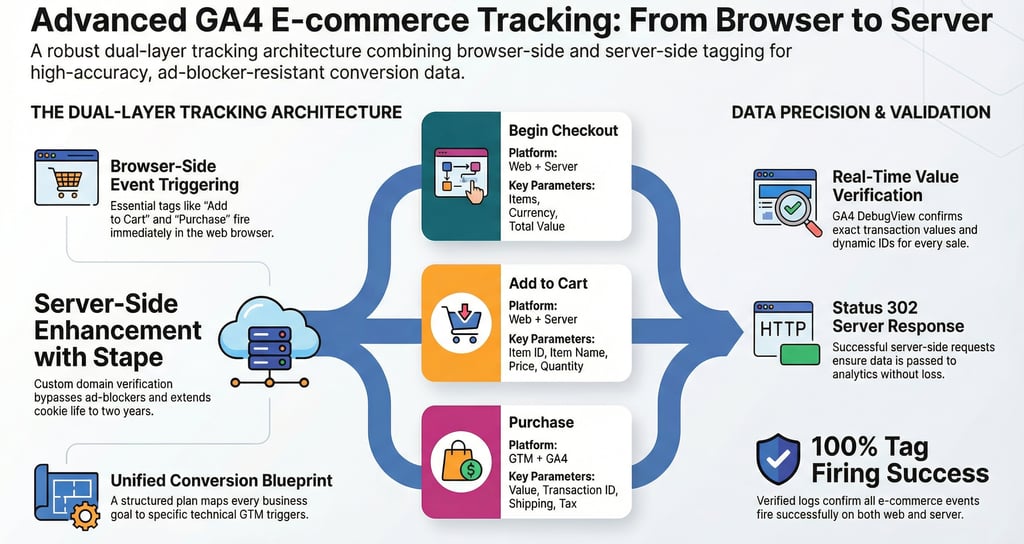
My approach for this client was to build what I call a two-layer setup: browser-side tracking as the primary layer, server-side as the reinforcement, and a living Blueprint Sheet as the documentation layer underneath both.
Layer 1 — Browser-Side Tracking (Web GTM)
The browser side handles the full GA4 ecommerce funnel and Google Ads conversions directly from the client's website via Google Tag Manager.
Events covered:
view_item_list, view_item — product interest signals
add_to_cart, view_cart — funnel entry signals
begin_checkout, add_shipping_info, add_payment_info — high-intent signals
purchase — the primary revenue conversion, with dynamic transaction ID, value, tax, and shipping
For Google Ads specifically, the setup includes a Conversion Linker tag (stores GCLID in 1st-party cookies to protect attribution), primary Purchase conversion, secondary Add to Cart and Begin Checkout, and — importantly — an Enhanced Conversions tag that sends SHA-256 hashed email and phone data at the point of purchase.
Why enhanced conversions matter: When a user sees your ad on mobile but converts on desktop, standard tracking loses that connection. Enhanced conversions recovers up to 15% of conversions lost to cross-device journeys by matching hashed user data against Google's signed-in users. For a brand spending $20k/month, that 15% is the difference between an algorithm that's guessing and one that's learning accurately.
Layer 2 — Server-Side Tracking (Server GTM via Stape)
This is where the setup becomes future-proof.
Browser-side tracking will always have vulnerabilities — Safari's ITP caps cookies at 7 days, ad blockers strip requests, iOS privacy updates keep tightening. Server-side tracking moves data collection off the user's browser entirely and routes it through a secure server you control.
Here's what the server-side layer does in this setup:
Custom Domain via Stape: Instead of firing to Google's standard endpoint, all data routes through a custom domain verified under the client's own brand. This does two things — it bypasses ad blockers (because the request looks first-party to the browser) and it extends cookie lifetime from 7 days to 2 years, preserving new vs. returning visitor accuracy despite Safari and Chrome restrictions.
Server-Side GA4 Tag: The advanced GA4 server template captures full ecommerce schema server-side, including User IP, User-Agent, and Client ID — data that browser-side tags frequently lose.
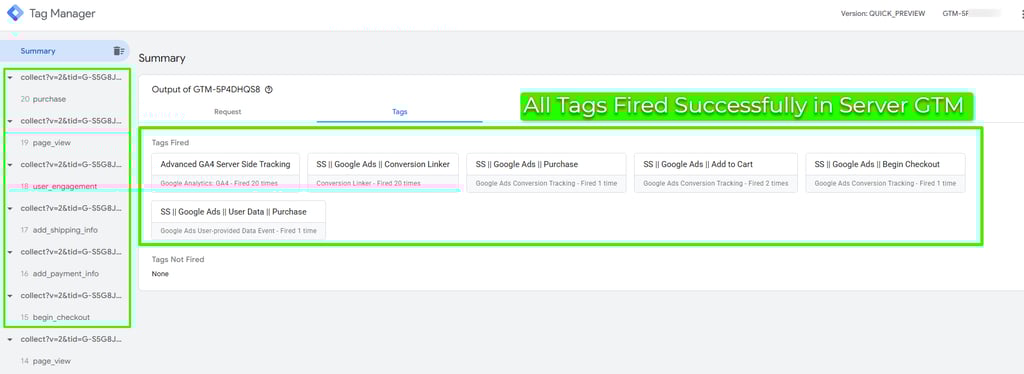
Server-Side Google Ads Tags: Purchase, Add to Cart, Begin Checkout, Conversion Linker, and Enhanced User Data all fire again at the server level. This isn't double-counting — events are deduplicated using unique transaction IDs, so Google only registers each conversion once. What the server layer provides is a reliable fallback that captures conversions the browser layer missed.
Proof It Works: Real-Time Validation
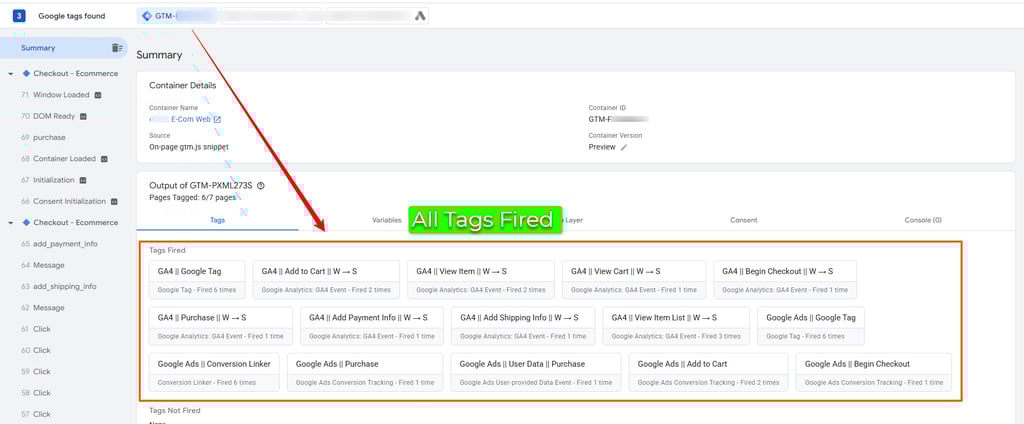
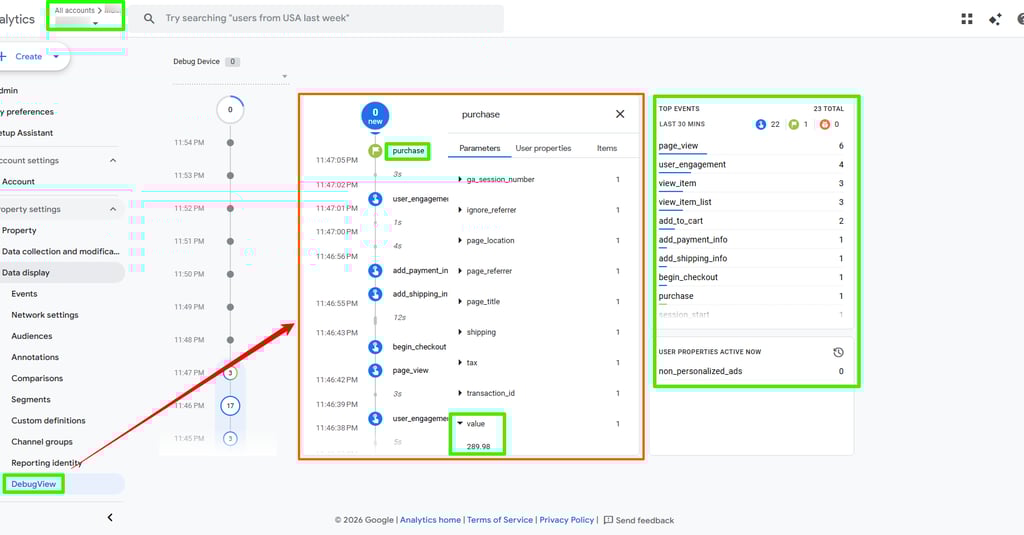
Before handing off any setup, I validate everything in real-time using GTM Preview Mode and GA4 DebugView.
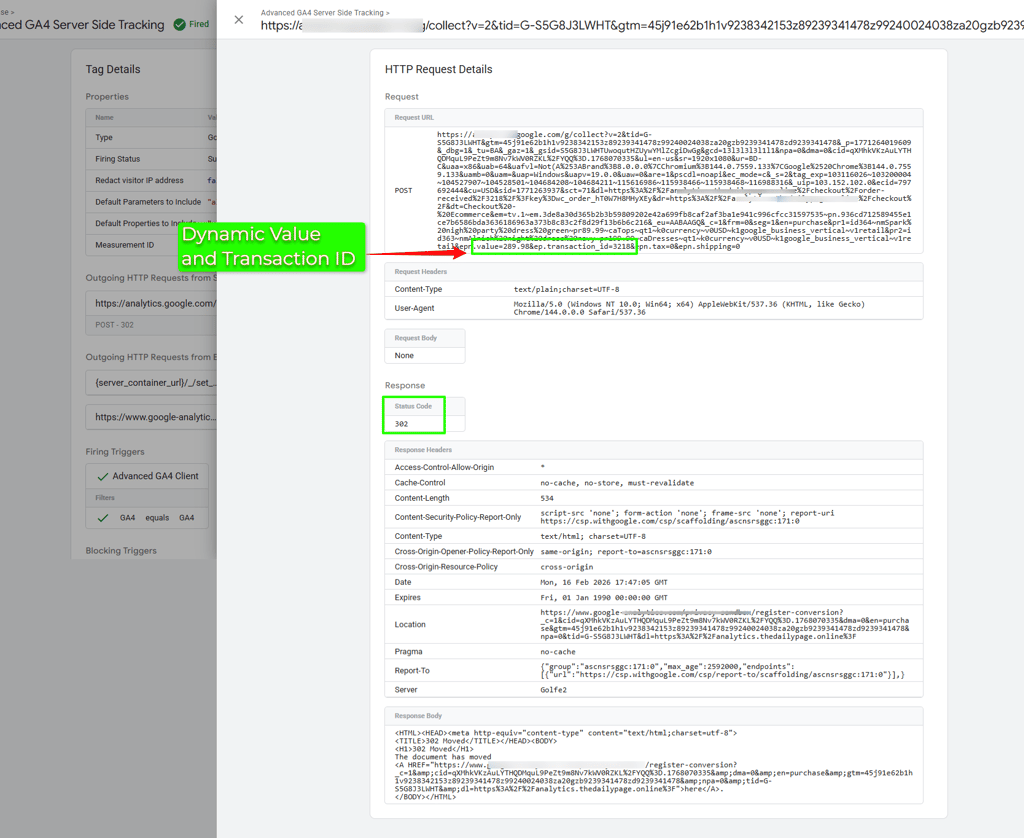
For this client, the DebugView showed the complete event sequence firing in order: page_view → view_item → add_to_cart → begin_checkout → add_shipping_info → add_payment_info → purchase — with the correct dynamic value ($289.98) and transaction ID attached.
The server-side GTM Preview confirmed every server tag fired successfully, with the HTTP request returning a 302 (successful redirect to Google's collection endpoint).
No misfires. No missing parameters. Clean data from day one.
The Part Most Agencies Skip: The Conversion Blueprint Sheet
This is the piece I'm most proud of, and the one clients react to most strongly.
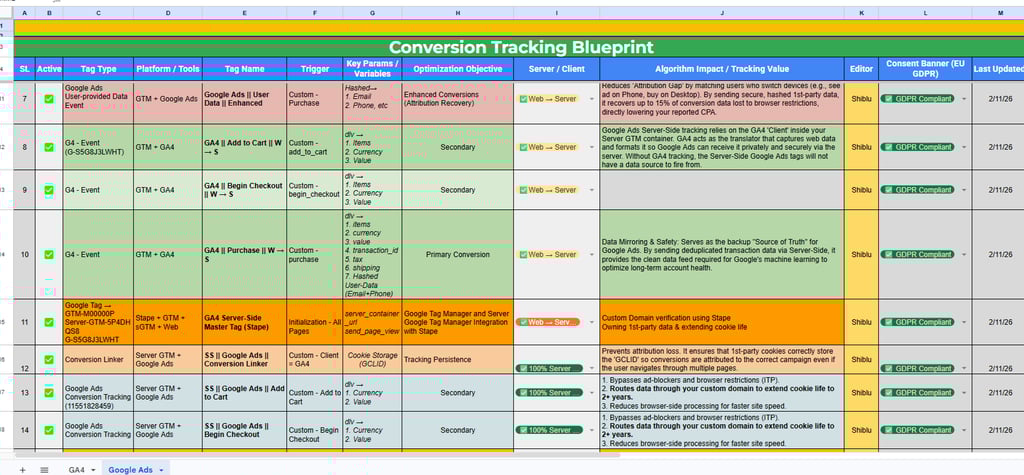
Every tag, trigger, platform, parameter, and configuration decision is documented in a structured Google Sheet — what I call the Conversion Blueprint. It's not a simple list of tag names. Each row includes:
Tag name + type (GA4 event, Google Ads conversion, Stape template)
Platform layer (Web GTM, Server GTM, or both)
Key parameters being passed (items array, currency, value, transaction ID, hashed user data)
Business objective — not just what fires, but what signal it captures and why it matters for the algorithm
GDPR / consent status
Editor name and last updated date
For example, the GA4 Purchase tag is labelled "Revenue Source of Truth" with a note: "Server-side delivery ensures 100% data accuracy by bypassing browser blocks. Ultimate metric for MMM and LTV calculations."
The Google Ads Enhanced User Data tag is labelled "Attribution Recovery" with a note explaining how hashed 1st-party data recovers cross-device conversion gaps and improves Data Match Quality scores.
When the client saw this, their exact response was: "This is the first time I actually understand what's running on my site."
Fellow tracking specialists who reviewed the system agreed — it makes handoffs, future audits, and scaling significantly easier. When a new developer joins in six months, they don't need to reverse-engineer GTM. When a new agency takes over, they have a clean map. When you want to add Meta CAPI later, you know exactly what's already in place.
Why This Setup Is GDPR-Compliant
All tags in this setup are flagged with GDPR consent status and fire only after a valid consent signal. The hashed user data sent via Enhanced Conversions uses SHA-256 encryption — Google never receives raw PII, only a one-way hash that can be matched but not reversed.
Server-side routing through Stape also adds an additional privacy layer by masking the user's raw IP address before it reaches Google's infrastructure.
Who Is This Setup For?
This architecture is right for you if:
You're an ecommerce brand spending $5,000+/month on Google Ads and your conversion data doesn't feel trustworthy
You've had a developer or agency set up tracking but have no documentation of what was done
You're seeing attribution gaps — sales in your store that don't appear in GA4 or Google Ads
You're planning to scale and need your algorithm to have clean, complete purchase signals to bid against
You're in or selling to EU markets and need GDPR-compliant first-party data infrastructure
Need This for Your Store or Clients?
I build complete GA4 + Google Ads tracking setups like this for ecommerce brands. Every project includes the Conversion Blueprint Sheet so you always know what's running and why.
If your current tracking feels like a black box — or you're not confident your purchase data is reaching Google accurately — I'd be happy to take a look.
Free 30-Minute Consultation
If your Meta CAPI, GA4, Google Ads, server-side GTM, or offline conversion tracking feels unclear, broken, or incomplete — I can help you identify exactly what to fix and how.
No sales pressure. · No commitment required. · Just actionable advice.
Need Help With Your Tracking Setup?
Contact
Reach out anytime for tracking help.
© 2026. All rights reserved.
Connect with me on LinkedIn